.NET Blazor is a framework that lets you write interactive web UIs in C# instead of JavaScript. It supports two hosting models — Blazor Server (real-time via SignalR) and Blazor WebAssembly (client-side via WASM). This guide covers how Blazor works under the hood, when it is the right choice, and what pitfalls to watch out for based on real project experience.
Hi everyone. My name is Vladyslav Furdak, and I’ve been working in .NET development for 13 years. I’m a Microsoft MVP, and I’m involved not only in development but also in mentoring engineers and helping companies with hiring. If any of that sounds relevant to you, feel free to reach out.
The last major project I worked on was a SaaS portal where the entire client-side application was built with Blazor WebAssembly (WASM). In this article, I’ll share my hands-on experience with the framework and my perspective on its strengths and weaknesses, its market niche, and when it makes sense to use it. By the way, I'm also the author of a NuGet package called BlazorNexus that makes routing in Blazor WASM applications more convenient.
How Blazor emerged and what it is
Blazor is essentially C# running in the browser. How is that even possible?
Let’s start with a quick refresher on WebAssembly. WASM is a technology that first became available in browsers in 2017. At its core, it’s a virtual machine that executes WebAssembly bytecode in a sandboxed environment - conceptually similar to containerization. High performance is achieved because instructions written in other programming languages can be compiled into efficient code that runs on the client machine.
To run code in WASM, an application written in C++, Go, or Rust must be compiled into a *.wasm module. WebAssembly can also call JavaScript functions to execute them in the browser's context. From a .NET perspective, this is implemented via calls to special methods in dotnet.js, which then invoke browser APIs.
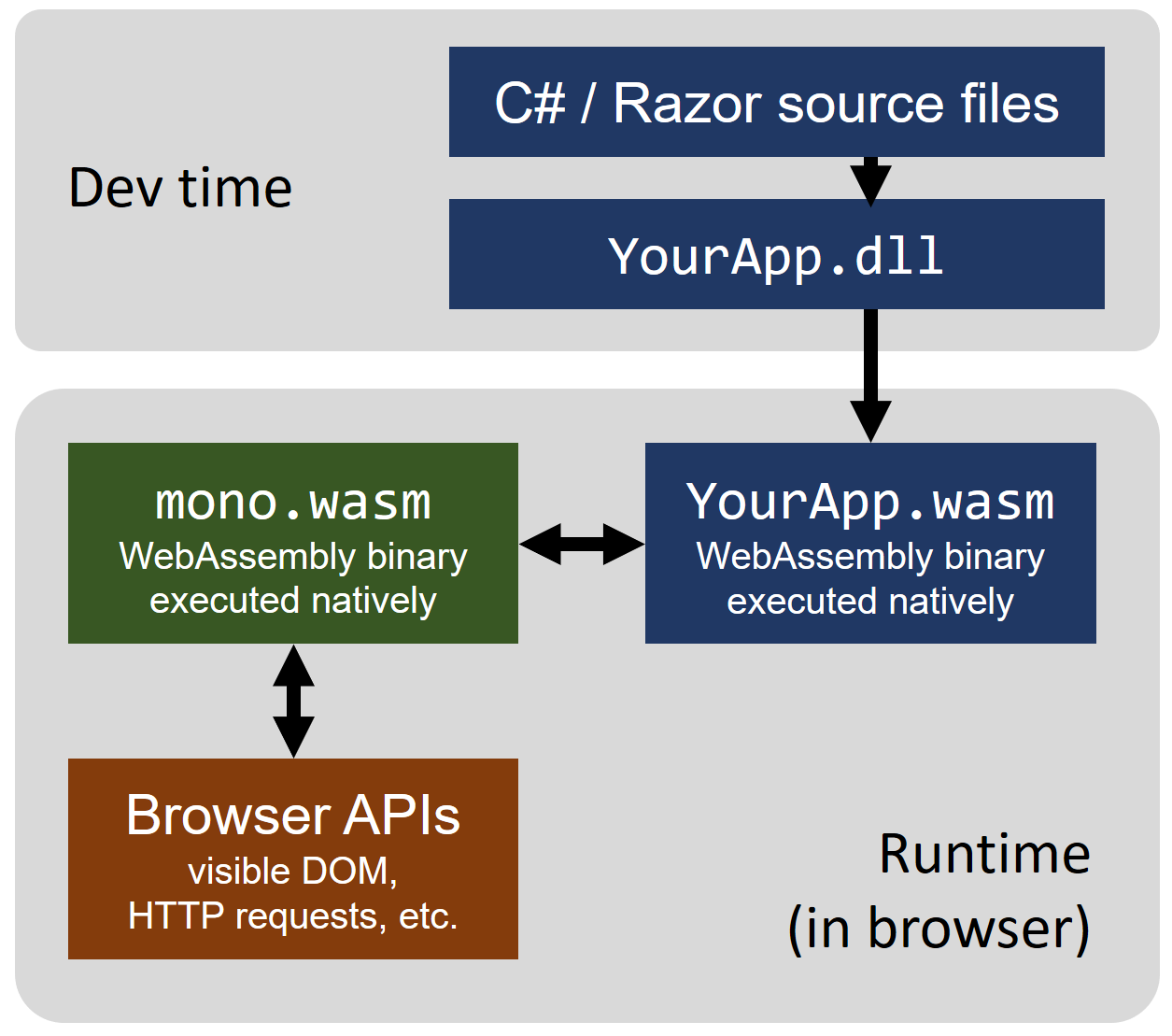
At this point, the Mono runtime comes into play. Mono has been compiled for WASM, so it can run inside the WebAssembly sandbox. Once you have .NET in the browser and a programmatic way to interact with browser APIs, it’s logical to build a front-end framework in C# on top of that. That framework is Blazor.
Conceptual diagram:
Blazor’s older and younger siblings
There have been many attempts to enable the development of interactive browser applications without JavaScript and HTML.
Platform
Release year
Native browser support
Requires
Open development
Contributors
Java Applets
1995
No
JVM plugin
No
Sun
ActiveX
1996
Yes (IE)
ActiveX
No
Microsoft
XUL
1999
Yes
Mozilla
No
Mozilla
Java Web Start
2001
No
JVM plugin
No
Sun
Flash/Flex
2004
No
Flash Player plugin
No
Macromedia/Adobe
Silverlight
2007
No
Silverlight plugin
No
Microsoft
XBAP
2008
No
.NET Framework 3, Windows
No
Microsoft
JavaFX
2008
No
JVM plugin
No
Sun
Yew, Percy
2018
Yes (Mozilla, Chrome, Safari, Edge)
WebAssembly
Yes
Open source community
Uno
2018
Yes (Mozilla, Chrome, Safari, Edge)
WebAssembly
Yes
Inventive / open source community
Blazor
2019
Yes (Mozilla, Chrome, Safari, Edge)
WebAssembly
Yes
Microsoft
Flutter on Web
2021
Yes (Mozilla, Chrome, Safari, Edge)
WebAssembly
Yes
Google
Why Blazor is the most successful attempt for a .NET developer
It is based on the W3C WebAssembly standard.
It builds on HTML as the primary UI foundation - unlike XAML in Uno or Dart in Flutter.
It has native browser support in almost all modern browsers and does not require vendor-specific extensions.
It has a strong developer base - anyone who knows C# can write Blazor apps. C# is significantly more popular than Dart (Flutter) and Rust (Yew, Percy).
It leverages the full power of the .NET ecosystem.
It supports most of the top UI component libraries that have become the standard for rich UI applications, for example: DevExpress, Telerik, Material UI (MudBlazor).
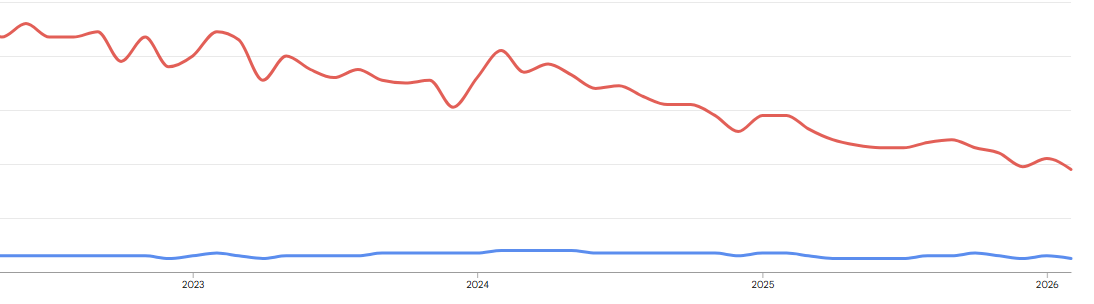
By the way, here’s the Google Trends chart for the query "Blazor". While frameworks like Angular have higher absolute popularity, Blazor shows steady interest, with periods of growth. Angular, on the other hand, shows a downward trend.
Is Blazor a competitor to React or Angular?
I’ll say it upfront - Blazor is not a competitor to React, Angular, or Vue. Comparing it to those frameworks is the wrong framing. Blazor solves a much narrower problem - giving C# developers a more modern and flexible way to build web applications compared to MVC or WebForms.
Blazor falls behind
Blazor is on par
Blazor wins
The number of NPM packages is an order of magnitude higher than NuGet.
Rapid SPA development with modern UI suites like Telerik, Radzen, DevExpress, Syncfusion.
Web on mobile, or MAUI hybrid apps - this competes with Cordova/Ionic.
The job market for experienced front-end specialists is orders of magnitude larger in the JS ecosystem.
You can support both SPA and server-side rendering formats.
Building PWAs where bundle size is not critical.
Blazor cannot directly call browser APIs - it goes through JSInterop. This adds performance overhead and still requires writing JavaScript.
Sharing a single C# codebase with desktop applications, or using API clients generated by NSwag on the front end.
Hot Reload is less stable than in the JS ecosystem.
Bringing in C# engineers to build complex web apps, and lowering the entry barrier for C# developers moving into modern front-end work - Razor in Blazor is very close to cshtml.
Better refactoring and debugging tooling thanks to C#.
So, to summarize, Blazor is an ideal fit for:
Building front ends using advanced, ready-made UI suites (for example, DevExpress).
Prototyping web applications with teams that do not specialize in front-end development.
Building SPAs that do not require deep interaction with browser APIs. Examples include dynamic behaviors tied to element sizes, and integrations with Audio/Video APIs. You can still implement this in Blazor, but you will need to wrap that functionality into isolated components and wire in JS code.
Building intranet applications that should not be sensitive to network latency - using Blazor Server. This lets you avoid implementing a separate API layer between front end and back end. There are even cases where public marketplaces are built with Blazor Server.
Cross-platform development with MAUI Hybrid, or extracting a shared codebase for web and mobile apps.
Blazor is a poor fit for:
Highly dynamic web applications like Google Maps.
Unique UI mechanics that still require importing a lot of JS libraries. In that scenario, it’s often simpler to pick React with its massive package ecosystem.
Web apps that heavily depend on browser APIs.
Public websites or portals. If you choose WASM - initial load can be slow. If you choose Server - you may need a lot of RAM on the server and you can run into UX issues.
This does not mean you cannot ship these kinds of projects on Blazor - it just means it will typically take more effort than with other frameworks.
Non-obvious aspects of Blazor development
What are real-world cases where Blazor requires JavaScript integration?
Case 1 - SessionStorage or LocalStorage
These are browser APIs. There are NuGet packages like Blazored.SessionStorage that hide the JS layer and isolate the interop. If you’re curious how it works, you can read the package source code.
Case 2 - Chat window dynamics
Imagine a chat window like Skype. A lot of new messages arrive, and you need to scroll the message area to the beginning of the new messages.
This breaks down into three tasks:
Scrolling the chat container to the top of the newly received messages.
Placing a separator between new and old messages.
Adding JS handlers that monitor scrolling and automatically load older messages - essentially implementing infinite scroll, like Facebook or Instagram.
For example, Google reCAPTCHA or a payment gateway widget. If you're lucky, there will be a ready-made package like GoogleCaptchaComponent. If not, you’ll have to build a wrapper yourself. I cannot claim that all widgets are covered by Blazor packages.
Case 4 - Building a custom audio recorder on top of MediaRecorder or WebRTC streams
This is a real requirement, but it becomes complicated if part of the logic lives in Blazor and part in JS.
A non-obvious challenge is platform-specific limitations. For example, in Safari, not only does type casting behave differently than in Chrome, but there are also restrictions around programmatic audio playback.
If you use a UI kit like MudBlazor and wire a button handler that triggers audio playback via JS interop, nothing will play - and you might not even see an error.
That happens because under Apple policy, audio playback must be initiated by a direct user interaction. In other words, the handler must be attached directly to the user action. In our case, we trigger playback programmatically via JS interop (C# WebAssembly -> JS), which Safari can block.
TODO list - starting a new Blazor project
What should you think about when starting a new Blazor project?
WASM: Your app runs in the client browser sandbox. It behaves like a classic client-side web app. It communicates with the server using standard approaches - HTTP calls, socket connections, etc. This is a good fit when you have a large number of clients. The Mono runtime is downloaded once and cached on the client. A typical initial download size for an empty project is around 8 MB. In practice, a real project might be closer to ~12 MB of one-time traffic. In the modern web, this is often negligible compared to tens of megabytes of assets.
Blazor Server: The Mono runtime is not downloaded to the client. Only a JS bundle is loaded, typically under 1 MB. A server session is created per user. UI events are sent to the server, processed there, and the UI updates are returned as DOM diffs/patches. With an unstable connection, this model can feel laggy. It also requires more server memory. Upsides - no need to build a separate API layer, and initial load is typically faster.
Blazor Hybrid: Enables Blazor apps to access device APIs. This is convenient for building Blazor MAUI Hybrid apps via WebView. To understand the mechanics, it's worth reading the official MAUI Hybrid tutorial series.
Component rendering model
Component render modes are not the same as the hosting model above. It mainly matters for Interactive Server and Auto, because a pure WASM app uses Interactive WebAssembly as the default component mode.
In short:
Mode name
Description
Interactivity
Static Server
Components are rendered on the server and sent to the client as static HTML. No interactivity. Good for content that does not need user interaction after the page loads.
No
Interactive Server
Components are rendered on the server with interactivity provided via SignalR. User actions are sent to the server, business logic runs there, and UI updates are pushed back in real time.
Yes
Interactive WebAssembly
Components run in the browser via WebAssembly. All required code is downloaded to the browser, allowing the app to work independently after the initial load.
Yes
Interactive Auto
Starts as Interactive Server, then continues as Interactive Client. This is comparable to SSR in modern full-stack frameworks like Next.js.
Yes
In general, Blazor lets you combine different rendering models. You can render some parts on the server, then hydrate on the client. Or you can stream a component progressively, which makes Blazor feel closer to Next.js mechanics.
UI kit and building a component library
If you have a custom design (for example, designed in Figma), you should agree upfront how you’ll implement it. Think through breakpoints for responsive UI (MudBlazor breakpoints differ from Bootstrap breakpoints). It’s usually best to start by building a component library - a set of customized and/or built-from-scratch components that are independent and reusable across the project. For hosting component documentation, there is BlazingStory, and there is also a Storybook port for React.
If you choose MudBlazor, I’m not a fan of structural elements like MudPaper, MudGrid, MudCard. I prefer building layout using Flexbox or CSS Grid. It’s typically faster and more flexible for layout composition.
Use Blazor CSS isolation for local modifications of a global theme - it’s very convenient.
Decide early whether you need native mobile UI elements support. For example, MudBlazor does not provide that out of the box.
Choosing a state management pattern
Blazor naturally fits MVVM because components support data binding out of the box.
There are several ways to organize component code:
Inline.
Put code at the end of the file inside @code.
Use a code-behind approach by extending the component partial class.
Create a separate ViewModel that encapsulates view logic.
If your project is bigger than a personal landing page, I’d recommend separating ViewModels. Here's an example of ViewModel abstractions showing how you can structure them for your project.
You can also nest ViewModels inside other ViewModels, connecting them via events. I consider this the simplest way to decouple logical component relationships from the view-to-view wiring.
If your state is extremely complex and looks more like a state machine, MVVM can become messy due to non-deterministic state. In that case, consider FLUX (Redux) via Fluxor. This unidirectional data flow approach was very popular in React.
Additional compilation settings
RunAOTCompilation - AOT compilation builds platform-specific code ahead of time, without needing to run JIT at runtime. This can improve performance if you have . NET-heavy algorithms.
WasmStripILAfterAOT - Removes IL after AOT compilation, reducing bundle size.
WasmEnableSIMD - Enables SIMD CPU instructions. In short, it can improve performance on newer platforms and break execution on older ones. Tests show it adds about 100 KB to the bundle.
A more detailed description of these and other settings can be found here.
Routing
In my opinion, the default routing system based on string constants in component directives is not very convenient because endpoints can change. You also need to think through back navigation within an SPA. For example, you might have several pages that can lead to a payment page, and then you need to return back correctly.
I handled these scenarios while modernizing routing for WASM Blazor apps in the Blazor.Nexus package. For any moderately complex app, you’ll still have to design a routing strategy anyway.
The package is in alpha, but it’s already usable and covered with unit tests. I keep it in alpha because there are still edge cases to address.
Internationalization (i18n) and localization (l10n)
The default approach in Blazor, like in most .NET stack apps, is to use resx files. This approach has been proven over years of ASP.NET MVC and WebForms development.
A more advanced approach is Portable Object (PO) files. Unfortunately, the most well-known PO SDK, Orchard Core Localization, does not work in a WASM environment. It works only with Blazor Server or a standard ASP.NET backend. Examples can be found here. A possible workaround is to serve translations via an API from the server.
For WASM Blazor apps, you can consider the lightweight Toolbelt.Blazor.I18nText package.
In the project I worked on, we used an existing proprietary library that generated code from our internal translation format. The client company built it for themselves and reused it across their applications.
Libraries and dependencies
Be aware that some Blazor libraries are no longer maintained. Some authors do not maintain them actively, and they can go years without changes. I recommend being very selective about what you bring into a project, and if it’s something small - it can be better to implement it yourself.
Not sure what to start with? I suggest the following stack:
MudBlazor - a fairly universal and free library, reasonably customizable.
Blazored.LocalStorage / SessionStorage - useful for storing state in the browser.
Auto-generated HTTP clients - if you are not using server-side Blazor, and your back end has an OpenAPI spec, you can generate C# API clients. The back end does not have to be in C#, but using C# clients is very convenient. For a C# back end, this is typically NSwag.
Add a JS bundler like Vite or Webpack if you plan to write JS. You can integrate the JS build as a separate MSBuild step via the csproj, like in this example.
Building a PWA
If you need a PWA, there is a Blazor PWA guide from Microsoft. Also, pay attention to a package that supports automatic PWA updates.
Component testing
For component testing, you can use bUnit - a testing library for Blazor components.
Kyiv Machine emulator - an emulator of the OEM "Kyiv" computer, a pioneering machine in Europe, and arguably one of the first to have an explicit pointer concept as part of the programming language (back then called "autoprogramming").
Blazor Server vs Blazor WebAssembly
Choosing the right hosting model is one of the first decisions in any Blazor project.
Blazor Server
Components execute on the server. Every user interaction travels over a SignalR (WebSocket) connection, and the server sends back UI diffs. The initial page load is fast because only a small script is downloaded, but the app requires a persistent connection — high latency or dropped connections degrade the experience. It is a good fit for internal dashboards and enterprise tools where network quality is controlled.
Blazor WebAssembly (WASM)
The entire .NET runtime and your app DLLs are downloaded to the browser. After the first load the app runs fully client-side — it can even work offline as a PWA. The trade-off is a larger initial download (several MB) and slower startup while the runtime initializes. It works well for public-facing SPAs and scenarios where offline support matters.
When to choose which
Initial load — Server is fast; WASM is slower (large download).
Offline support — Server: no; WASM: yes (PWA).
Server resources — Server: higher (one circuit per user); WASM: lower (static hosting).
Latency sensitivity — Server: high (every click goes to server); WASM: low (runs locally).
Best for — Server: internal tools, dashboards; WASM: public SPAs, offline apps.
Starting with .NET 8, you can also combine both models using Blazor United (Auto render mode), which starts with Server rendering and switches to WASM once the runtime is downloaded.
Frequently Asked Questions
What is Blazor in .NET?
Blazor is a .NET framework that lets you build interactive web UIs using C# instead of JavaScript. It compiles to WebAssembly (client-side) or runs on the server via SignalR, so .NET developers can share code between frontend and backend.
What is the difference between Blazor Server and Blazor WebAssembly?
Blazor Server runs components on the server and sends UI updates over a SignalR connection - fast initial load but requires a persistent connection. Blazor WebAssembly downloads the .NET runtime to the browser and runs entirely client-side - works offline but has a larger initial download.
Is Blazor ready for production?
Yes. Blazor has been production-ready since .NET Core 3.1 (Server) and .NET 5 (WebAssembly). Microsoft actively develops it, and companies use it for internal tools, dashboards, and SaaS portals.
When should I use Blazor instead of React or Angular?
Blazor makes the most sense when your team already knows C# and .NET, you want to share models and validation between frontend and backend, or you are building an internal enterprise app where the larger WASM download size is acceptable.
Can Blazor replace JavaScript completely?
Not entirely. Blazor handles most UI logic in C#, but you may still need JavaScript interop for browser APIs, third-party JS libraries, or performance-critical DOM manipulation.
Summary
Blazor is not a silver bullet. I recommend weighing the pros and cons before starting a new project on this framework. The technology is fairly niche, but it has been production-ready for quite some time.
Senior Software Engineer & Microsoft MVP with 15+ years building scalable backend systems. Founder of Ukraine's largest .NET community. Writes about clean architecture, design patterns, EF Core, Azure, and engineering career growth.

 Architecture